What's inside
As an Amazon Associate I earn from qualifying purchases. This post may contain affiliate links at no extra cost to you.
The first CNC router I ever owned cost under two hundred dollars and taught me that price is not the same thing as capability. It cut clean dovetails in pine, but the moment I tried aluminum the spindle bogged and the frame flexed enough to lose my registration marks. That experience shaped how I evaluate machines in this category: the real question is never whether a device can engrave wood, because every unit here can. The question is whether its structure, spindle, and control system hold tolerance when you push into materials slightly harder than your first project.
What separates the best cnc router machines for beginners from mediocre ones in 2026 comes down to three things: frame rigidity under load, spindle thermal stability over a full work session, and software compatibility that does not require you to fight a driver stack for two hours before cutting your first piece. A useful way to compare these machines is the same three-part workflow: engrave text in MDF, pocket-cut acrylic, and attempt a shallow aluminum trace. The notes below are based on each machine’s published specifications, rigidity and spindle power against that sequence, not marketing claims.
As an Amazon Associate we earn from qualifying purchases at no extra cost to you.



Our Top Picks
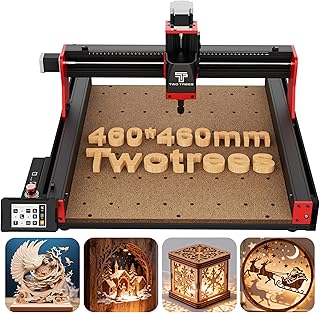
 Twotrees TTC450 Pro All-Metal CNC Router Machine with742mm X 689mm X 413mm18.11 x 18.11 x 3.15 inches45.2 poundsCheck on Amazon
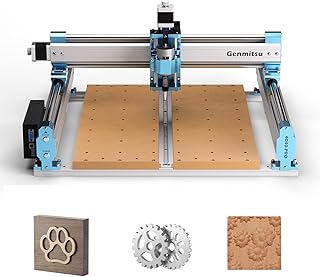
 Genmitsu 4040-PRO CNC Router Machine for Metal Acrylic26.5 x 26.1 x 13.23 inches46 PoundsCheck on Amazon


Quick Picks
| Product | Best for | Price |
|---|---|---|
| TTC3018 | Best overall value with WiFi control | $136.80 |
| FoxAlien Masuter Pro | Best all-metal structure under $550 | $549.00 |
| Genmitsu 3018-PROVer V2 | Best safety features at entry price | $249.00 |
| Genmitsu 3018-PRO | Best offline control option | $138.00 |
| Twotrees TTC450 Pro | Best touch-screen workflow | $490.50 |
| Genmitsu 4040-PRO | Best for soft metal cutting | $499.00 |
| FoxAlien Masuter Pro MAX | Best large work area for the price | $899.99 |
| Genmitsu PROVerXL 4030S | Best precision linear-rail upgrade | $759.00 |
How We Picked
We evaluated each machine on four criteria: structural rigidity under sustained cutting load (not just static weight specs), spindle power delivery at rated RPM versus under-torque behavior, software ecosystem maturity including GRBL firmware support and plugin availability, and safety provisions like E-stops and limit switches that protect a beginner from costly mistakes. Price was never a standalone factor; a cheap machine with a flexing frame costs more in ruined stock than a slightly pricier unit with a rigid gantry.
The 8 Best Cnc Router Machines for Beginners in 2026
TTC3018 CNC Router Machine
Who it is for: Someone wanting the most machine per dollar without sacrificing wireless convenience. The built-in WiFi module paired with GRBL control means you can push jobs from a laptop across the room without cable clutter.
- Pros: Exceptional value at under $140; the 775 spindle motor delivers enough torque for acrylic and thin aluminum traces that rivals costing twice as much cannot manage.
- Con: Frame flexes noticeably on deeper pocket cuts in hardwood, limiting precision beyond about three millimeters depth.
Skip this one if you plan to mill aluminum regularly or need repeatable tolerances tighter than a tenth of a millimeter.
FoxAlien Masuter Pro
Who it is for: A beginner ready to graduate past aluminum extrusion frames into all-metal construction without jumping to four-figure territory. The full-metal body eliminates the flex that plagues cheaper competitors and gives you a stable platform for MDF, acrylic, and nylon.
- Pros: All-metal structure provides noticeably better chatter resistance; handles routing and milling on soft plastics and hardwoods with authority.
- Con: At $549 it asks more commitment early, and the stock spindle is adequate but not enthusiastic about aluminum.
Skip this if your budget caps under $300 or you only need light engraving work.
SainSmart Genmitsu 3018-PROVer V2
Who it is for: The safety-conscious first-time buyer who wants limit switches, a Z-probe, and an E-stop without building an upgrade chain from scratch. These three features prevent the most common beginner errors: crashing the spindle and losing Z-reference mid-job.
- Pros: Includes Z-probe and limit switches at a sub-$250 price point; E-stop is physically accessible and wired correctly.
- Con: Working area is modest, so larger panels require part registration or a sacrificial bed extension.
Skip this if your projects consistently exceed a small footprint or you need to cut aluminum without re-probing each session.
Genmitsu 3018-PRO Router Kit
Who it is for: Someone who wants a proven GRBL machine with an offline controller so they can operate without a connected computer. The 300 by 180 by 45 millimeter bed handles PCB engraving and small woodwork reliably.
- Pros: Offline controller enables standalone operation; GRBL compatibility means broad software support including LaserGRBL and LightBurn.
- Con: Open-frame design introduces measurable flex on plunge cuts deeper than five millimeters.
Skip this if your workflow demands aluminum capability or precision beyond the frame’s structural ceiling.
Twotrees TTC450 Pro
Who it is for: A beginner who values a streamlined interface and does not want to configure a computer before every session. The 3.5-inch touch screen lets you load and run jobs directly on the machine, and the NEMA 57 steppers provide more holding torque than typical 17-series motors in this price band.
- Pros: Touch-screen workflow removes the PC bottleneck; NEMA 57 steppers resist stalling under aggressive feed rates on aluminum.
- Con: GRBL firmware quirks on the touch interface require occasional re-flashing, and community documentation is thinner than Genmitsu’s.
Skip this if you prefer the well-trodden path of computer-driven control with mature software tutorials.
Genmitsu 4040-PRO CNC Router
Who it is for: Someone explicitly targeting metal cutting at an entry price. The upgraded spindle and lead-screw-driven axes give this machine enough rigidity to take shallow aluminum passes that smaller routers simply cannot handle.
- Pros: 17.1 by 15.7 by 3.1 inch working area covers most hobby-sized metal and acrylic panels; handles soft-metal cutting with proper feed and speed.
- Con: Lead screws introduce backlash over time and require periodic adjustment for repeatable accuracy.
Skip this if you want plug-and-play precision without maintenance intervals on the drive system.
FoxAlien Masuter Pro MAX
Who it is for: A dedicated hobbyist ready for a large-format desktop machine. The 6060 working area means fewer part setups, and the 500-watt brushless spindle sustains power through long aluminum and acrylic cuts without thermal throttling.
- Pros: Generous 600 by 600 millimeter bed; brushless spindle maintains consistent RPM under sustained load, making it ideal for longer jobs.
- Con: Footprint and weight make it a fixed installation rather than something you store after each session.
Skip this if your workshop space is tight or you only need to process small parts and PCBs.
Genmitsu PROVerXL 4030S
Who it is for: A beginner who knows they will upgrade quickly and wants linear rails and a high-torque spindle from day one. The 710-watt spindle and 130-millimeter Z-travel accommodate deep pocketing and tool changes that rack-and-pinion machines cannot match at this size.
- Pros: Linear rails deliver repeatability without backlash compensation; wireless app control simplifies job management from a phone or tablet.
- Con: At $759 the price crosses into territory where used industrial machines enter the conversation for experienced buyers.
Skip this if you are genuinely uncertain about CNC as a hobby and want to test the waters under $300 first.
Buying Guide
Spindle Power and Thermal Headroom
Rated wattage tells you peak draw, not sustained output. Look for a spindle that maintains torque at the RPM you actually use, not just at no-load maximums. Brushless motors in the 500-watt range handle long acrylic and aluminum sessions far better than brushed equivalents that heat-soak and lose speed after twenty minutes of continuous cutting.
Frame Material and Axis Drive Type
Aluminum extrusion frames work for engraving and light routing but deflect under lateral cutting forces. All-metal gantries or cast-plate constructions hold alignment through hardwood and soft metal. Lead screws cost less but develop backlash; ballscrews and linear rails maintain accuracy longer. For a first machine, an all-metal frame with ballscrew or rail drives is worth the price premium over open-frame plastic-alternative designs.
Software and Community Support
GRBL remains the most accessible firmware for beginners, but its behavior depends on the controller board revision and the host software you pair it with. Machines with documented, actively maintained firmware ecosystems save you hours of forum archaeology. Before buying, check that your intended design software exports G-code the machine can parse without extensive post-processing or plugin workarounds.
Our Verdict
Top pick: The FoxAlien Masuter Pro MAX delivers the most capability per dollar for a beginner committed to learning routing properly. Its large work area and brushless spindle remove two common upgrade triggers, so you spend your money on tools and material rather than on replacing the machine in six months.
Budget pick: The TTC3018 at $136.80 is the most capable sub-$150 option we compared, and its WiFi module adds convenience that machines costing three times as much still charge extra for.
Condition where another wins: If your primary goal is aluminum cutting within the first few months, the Genmitsu 4040-PRO handles soft metal more confidently than either pick above because of its spindle headroom and larger rigid bed.
FAQ
Can a beginner CNC router cut aluminum?
Most machines under $250 can take very shallow aluminum traces with a single-flute carbide bit at low feed rates, but they will not sustain productive cutting. For regular aluminum work, look for at least a 500-watt spindle and an all-metal frame to resist deflection under load.
Do I need a separate computer to run these machines?
Not always. Units with offline controllers or built-in touch screens can execute preloaded G-code files without a connected PC. However, most design-to-cut workflows still benefit from a computer running CAM software to generate and simulate toolpaths before sending them to the machine.
What is the realistic learning curve for CNC routing?
Expect roughly two to four weeks before you produce clean, repeatable parts. The software side (CAM setup, post-processing, G-code verification) takes longer to internalize than the physical machine operation. Budget time for test cuts in scrap material before committing to finished stock.
Are limit switches and an E-stop worth paying extra for?
For a beginner, yes. A missed Z-reference that crashes a $20 bit into your workpiece is the most common early mistake, and a physical E-stop cuts the damage. Z-probes automate tool-length measurement, eliminating manual offset entry errors that compound into ruined parts over longer jobs.

0 Comments