What's inside
As an Amazon Associate I earn from qualifying purchases. This post may contain affiliate links at no extra cost to you.
The best CNC wood projects are the ones matched to three things: your machine’s work area, the thickest stock your bits can reach, and whether you’re cutting all the way through or just carving the surface. A 300×180 mm desktop machine and a 4×4 ft router both count as “CNC,” but the realistic project lists barely overlap. Below is a practical breakdown by skill level, then by material and machine size, so you can pick projects that finish instead of stalling.
As an Amazon Associate we earn from qualifying purchases at no extra cost to you.


Start Here: Match the Project to the Machine
Before choosing a project, check four constraints: work area (X/Y travel), Z clearance under the gantry, collet size (¼” bits need more rigidity than ⅛”), and spindle/trim-router power. These decide more about success than the project file itself.
| Machine class | Typical work area | Max realistic wood thickness | Bits that make sense | Project territory |
|---|---|---|---|---|
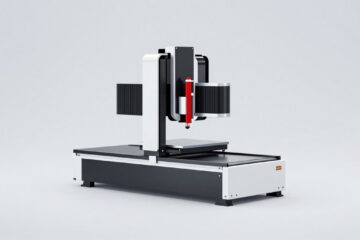
| Desktop (3018-style) | 300×180 mm | 10–12 mm softwood, 6 mm plywood | ⅛” flat endmill, 30–60° V-bit | Coasters, keychains, small signs, inlay tests |
| Mid-size (X-Carve / Shapeoko class) | 750–1000 mm square | ~25 mm hardwood | ⅛” and ¼” endmills, V-bits, ballnose | Cutting boards, signs, boxes, small furniture parts |
| Full sheet / 4×4 ft+ | 1200×1200 mm and up | 18–19 mm plywood standard, 38 mm+ hardwood | ¼” compression/spiral, surfacing bit | Cabinetry, stools, wall panels, batch production |
Beginner Wood CNC Projects
Beginner projects should teach one skill each: V-carving, profile cutouts, or 2-sided tabs. Keep stock under 12 mm and use softwood or Baltic birch plywood — they forgive feeds and speeds that are slightly wrong.
- Coasters and trivets — profile cutout plus a V-carved monogram. Teaches workholding and bit changes. Material cost: under $1 each in pine or bamboo blanks.
- V-carved signs — text on a 300×400 mm pine board. Teaches depth control; a 60° V-bit at 3–4 mm depth reads crisply in softwood.
- Keychains and tags — batch 10–20 from a single plywood sheet. Teaches tabs, feeds, and why ramping into cuts matters.
- Simple inlay (one material) — epoxy inlay into a routed pocket is more forgiving than wood-on-wood. Teaches pocketing and surface cleanup.
- Puzzle and gear cutouts — free files abound; teaches kerf awareness and finishing work.
The common beginner mistake is feed rate: too slow burns pine and dulls bits, too fast chatters plywood edges. For a ⅛” flat endmill in pine, roughly 1500–2000 mm/min at 3–4 mm depth per pass is a safe neighborhood to start from.
Intermediate CNC Wood Projects
Intermediate means you’re doing pockets, multi-bit jobs, or joining parts the CNC cut. Expect some waste while you dial in.
- Finger-joint or finger-slot boxes — plywood boxes teach inside/outside profile offsets. If your box joints don’t fit, your machine’s steps-per-mm or bit diameter setting is off — this project doubles as a calibration check.
- Cutting boards and serving trays — 18–25 mm hardwood, surfacing pass required. A 1″ surfacing bit flattens the board in-machine, which is the real skill here.
- Relief carving / 3D topographic maps — ballnose finishing passes teach stepover logic: 10% stepover looks smooth but takes hours; 15–20% with sanding is the practical compromise.
- Signs with layered lettering — glued-up layered letters teach registration and glue-up planning.
- Cribbage boards and game boards — precision hole drilling is harder than it looks; great for learning feeds for plunging versus cutting.
Advanced Projects
- Furniture components — stool seats, chair backs, mortise-and-tenon joinery cut on a mid-size machine.
- Two-sided and 4-sided machining — flip jigs for chair legs or turned-blank carving.
- Cabinetry and flat-pack furniture — a 4×4 machine earns its keep here; one 4×8 sheet of 18 mm Baltic birch (~$80–120) yields a small cabinet or two stools.
- Intarsia and fine inlay — wood-on-wood inlay demands backlash under ~0.1 mm and sharp ¼” downcut bits.
Material Choice Changes the Project
| Material | Cost (approx.) | Cut behavior | Best projects |
|---|---|---|---|
| Pine / softwood | $5–15 per board | Easy, burns if too slow | Signs, V-carving, practice |
| Baltic birch plywood | $40–80 per 5×5 ft sheet | Clean edges, minor tearout on top veneer | Boxes, puzzles, flat-pack furniture |
| Hardwoods (oak, walnut, maple) | $6–15 per board foot | Harder on bits; slower feeds | Cutting boards, inlay, heirloom pieces |
| MDF | $30–50 per 4×8 sheet | Dulls bits fast, very dusty, clean edges | Painted signs, jigs, templates |
| Bamboo | $30–80 per panel | Abrasive — use coated bits | Coasters, small décor, engraving |
MDF and bamboo eat endmills faster than solid wood — budget a replacement bit every few large projects when running them. Baltic birch is the best value for structural projects because the void-free core holds small joinery.
Decision Matrix: Which Project for Your Situation
| Your situation | Recommended starting project | Why |
|---|---|---|
| Desktop machine, under $50 material budget | Coasters and V-carved signs | Fits small work area; cheap stock forgives mistakes |
| Mid-size machine, want sellable items | Layered signs, cribbage boards | Low material cost, ~$30–80 retail per piece, batchable |
| Mid-size machine, hobby furniture | Box-joint boxes → stool parts | Builds joinery skills that scale to furniture |
| 4×4 or 4×8 machine | Flat-pack shelving, cabinets | Sheet goods amortize the machine cost fastest |
| Only ⅛” collet | Thin-stock projects under 12 mm | Small bits can’t safely reach deeper or take ¼” loads |
Worked Example: Cost of a Batch of Sign Projects
Say you run 10 V-carved signs on a mid-size machine: a $12 pine board yields two 300×400 mm signs, so $60 in stock. A 60° V-bit ($15–25) lasts roughly 40–60 softwood signs before edges soften — call it $5 per batch. Machine time is about 45–60 minutes per sign including setup. Total material-and-consumable cost lands near $7–8 per sign; signs in this style commonly sell for $35–60, which is why they dominate the beginner-to-seller pipeline. The same math for cutting boards is different: $15–25 in walnut/maple per board plus a surfacing bit amortized at ~$2 per board — margins are thinner but perceived value is higher.
Ownership Realities Nobody Lists in the Specs
- Bits are the real consumable. Budget $5–15 per month in bits once you’re cutting weekly; V-bits dull faster than most people expect in hardwood.
- Dust collection isn’t optional. MDF dust is fine enough to clog collets and rails; a $100 shop-vac boot pays for itself in reduced cleaning time.
- Workholding causes most failures. Most ruined wood CNC projects trace to a workpiece shifting, not bad feeds — double down on clamps, tabs, or tape-and-CA-glue before blaming settings.
- Surfacing your spoilboard matters. An unflattened spoilboard gives uneven cut depths; resurface it every 10–20 projects or when cut depths vary by more than ~0.3 mm.
FAQ
What’s the easiest first CNC wood project?
A single-profile cutout — a coaster or keychain — in 6 mm Baltic birch. One bit, one operation, and a failure costs under a dollar.
How thick can a desktop CNC cut wood?
Practically, 10–12 mm in softwood with a ⅛” bit, in multiple passes. Cutting 18 mm plywood on a 3018-class machine usually produces chatter and burned edges.
Do I need CAD skills before buying a CNC?
No. Free file libraries cover most beginner projects, and 2D tools like Carbide Create or Easel are learnable in a weekend. Move to parametric CAD when you start designing joinery.

0 Comments