What's inside
- Four-Axis CNC Machines for Woodworking: What to Compare Before Buying
- First, clarify what “four axis” means
- Compare the capacity that limits your actual projects
- Continuous rotation or indexing?
- Software can make or break the purchase
- Match the machine to your shop and workload
- Ownership details that affect finished work
- Four-Axis CNC Machines for Woodworking: What to Compare Before Buying
- First, clarify what “four axis” means
- Compare the capacity that limits your actual projects
- Continuous rotation or indexing?
- Software can make or break the purchase
- Match the machine to your shop and workload
- Ownership details that affect finished work
As an Amazon Associate I earn from qualifying purchases. This post may contain affiliate links at no extra cost to you.
Four-Axis CNC Machines for Woodworking: What to Compare Before Buying
Choose a four axis cnc machine by matching its usable rotary diameter and length to your largest workpiece, then check whether its rotary axis indexes or turns continuously and whether your software can generate the toolpaths your projects need. Those details determine whether the machine can carve a table leg or column in one setup—or only handle smaller, simpler turned forms.
First, clarify what “four axis” means
A typical three-axis CNC moves its cutting tool along X, Y, and Z. A four-axis woodworking setup adds a rotary axis, often called A, that turns the workpiece. The machine can cut around a dowel or blank to create features on multiple sides.
As an Amazon Associate we earn from qualifying purchases at no extra cost to you.


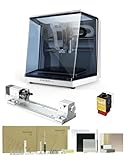
Some machines rotate continuously while the cutter works; others use the rotary axis to index the blank to set angles, then cut with the other axes. Some can do both, depending on the controller, software, and configuration. Don’t assume that a listing’s “fourth axis” includes every capability—or that it means the machine can simultaneously contour a complex shape. Ask the manufacturer which rotary operations are supported and what software and controller are required.
Compare the capacity that limits your actual projects
Rotary capacity is not just the advertised length of the bed. The distance between centers limits workpiece length, while the maximum rotary diameter is constrained by the spindle, gantry, chuck, tailstock, and any enclosure. Allow room for tool movement and clamps, and check the usable capacity with the rotary unit installed.
| Project situation | Useful capacity to seek | Why it matters |
|---|---|---|
| Small handles, knobs, and short decorative parts | About 50–100 mm (2–4 in) diameter; 300–500 mm (12–20 in) between centers | Compact rotary setups can suit short work, but check chuck clearance and how the blank is held. |
| Furniture legs and balusters | About 100–150 mm (4–6 in) diameter; 600–900 mm (24–36 in) between centers | Length often rules out an otherwise capable desktop machine. Include any tenons or waste at the ends in your measurement. |
| Long columns, newel posts, and substantial architectural parts | About 150–200 mm (6–8 in) diameter; 1,000–1,200 mm (39–47 in) or more between centers | These dimensions call for a larger, stiffer machine and a plan for supporting long stock and managing chips. |
These are planning ranges, not universal machine specifications. Confirm rated capacity directly, and measure the largest finished part plus its mounting allowance. A blank may need to be longer than the finished piece so the centers or chuck can grip it securely.
Continuous rotation or indexing?
Continuous rotation is useful for carving profiles around a spindle, reliefs that wrap around a column, and forms where the cutter must follow a coordinated path as the blank turns. It depends on a compatible controller and rotary toolpaths; a motor that can spin the blank is not enough by itself.
Indexing turns the blank to defined positions—often four or more sides—then holds it while the machine cuts. It can be a practical route to square or faceted legs, repeated flats, and designs divided into clear faces. It is less suited to a smooth, uninterrupted form unless the toolpaths are planned to blend the transitions.
When comparing machines, ask whether the rotary axis is included, whether it has a chuck and tailstock, how it is driven, and whether it can operate continuously or only index. Also ask if the stated capacity changes when the rotary unit is fitted. A machine’s standard flat-work area may shrink or become unusable during rotary work.
Software can make or break the purchase
Before choosing a machine, trace the workflow from design to finished part: can your CAD/CAM software model a round blank, position the rotary axis correctly, generate rotary toolpaths, and post-process code for the machine’s controller? Confirm the specific software version and post-processor, not just a general claim of compatibility.
For a first rotary project, a simple profile or faceted leg is easier to program and check than a sculpted column with changing cross-sections. Preview the toolpath and verify the stock diameter, axis direction, origin, and tool clearance. A mismatch in rotary-axis orientation or blank dimensions can cause the cutter to travel in the wrong place even if the model looks correct on screen.
Also consider whether the software supports simulations or collision checks, and whether the manufacturer provides setup guidance. Those features can reduce errors, but they do not replace a cautious first run above the workpiece or in scrap stock.
Match the machine to your shop and workload
| Your situation | What to prioritize | Likely trade-off |
|---|---|---|
| New to CNC, occasional small parts, limited floor space | A compact machine with documented rotary setup, usable software support, and modest diameter capacity | Lower space and setup demands, but limited length and headroom for furniture-scale work. |
| Experienced hobbyist making batches of legs or balusters | Enough between-centers length, repeatable indexing or continuous rotation, and reliable workholding | More setup and programming time, offset by the ability to repeat parts consistently. |
| Small production shop making long or large-diameter pieces regularly | Rigid frame, verified working envelope, capable dust collection, and accessible service parts | Higher purchase and installation costs, plus more room and maintenance planning. |
Budget for more than the machine: rotary hardware may be an add-on, and suitable cutters, workholding, dust collection, software, and training can materially increase the total. Compare complete configurations rather than base prices. General market prices vary widely by size and included equipment; small hobby setups can cost hundreds to a few thousand dollars, while larger or production-oriented machines can run from several thousand to tens of thousands.
Ownership details that affect finished work
Long stock magnifies small alignment errors. Check that the headstock and tailstock are aligned, the blank runs true, and the centers are secure before cutting. If a leg comes out with uneven facets or a changing diameter, investigate blank runout, axis alignment, tool deflection, and the toolpath before assuming the machine lacks power.
Wood dust and chips collect around bearings, the rotary drive, and the workholding. Follow the maker’s cleaning and lubrication schedule, keep dust extraction near the cut, and inspect belts, couplers, chuck jaws, and centers for wear or looseness. Dull cutters can burn or tear grain, especially when machining across changing grain direction. Use sharp tooling, conservative passes, and a test blank when learning a new material or setup.
For a prospective buyer, the strongest choice is usually the smallest machine that safely fits the longest and widest part you plan to make, with a rotary method and software workflow suited to the shape. If you expect to move from simple balusters to continuous sculpted columns, confirm that upgrade path before buying—not after the rotary attachment is already on the bench.
0 Comments